
Overview
Keep a record here of all Bank Accounts, Insurances, Pensions, Share Trading, Savings, Mortgages and the like. Not only is it a great place to store all the information in one place, it helps to compile a clear picture of everything in one place.
If you also use the VitaVault app (free for all Inheritable subscribers), this information integrates fully with your VitaVault account and the people you have designated to manage it.
When the toggle is on, every item you have shared is visible to the contacts you chose. When it is off, nothing is shared with anyone, even if individual items still have contacts set.
Your per-item sharing choices are always preserved, so you can switch everything back on at any time without setting it all up again.
Keep all your financial information in one secure place, so everything is easy to find and easy to pass on when it matters most.
File attachments added to finance entries are stored in your Digital Vault and count towards your storage plan, but are only accessible through the finance entry itself, not through the Digital Vault feature.
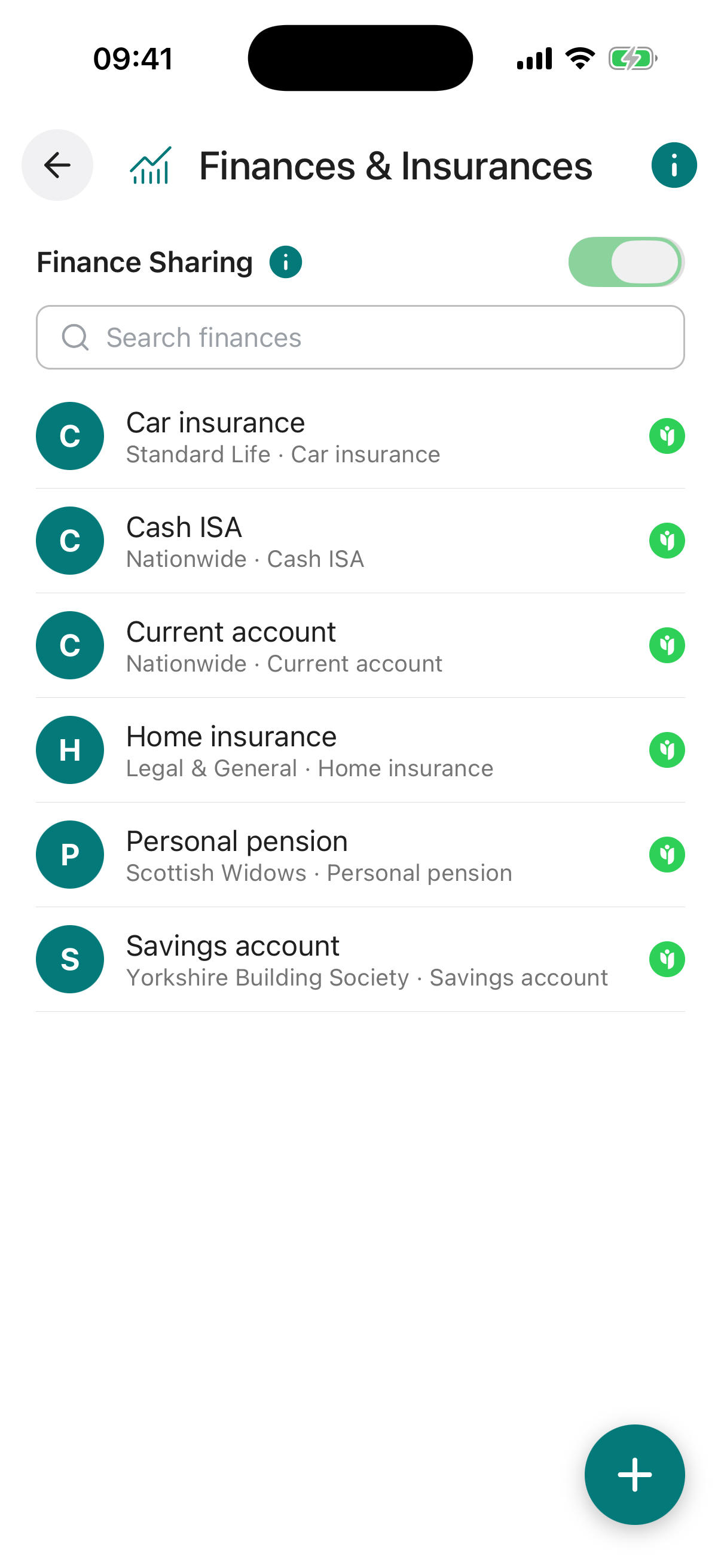
Finance Sharing Toggle. A master switch for all finance sharing. When off, no finance entries are shared with anyone, even if individual entries have a contact set. Your sharing settings are preserved so you can turn it back on at any time.
Finance Entries. Each entry shows the account or policy name with a coloured initial. Tap an entry to view or edit its details.
Share Icon. A green Angel icon appears on entries that are actively shared with a contact.
Add (+) Button. Opens the form to create a new finance entry.
Name required. A short, recognisable label for this entry, for example “Barclays Current Account” or “Life Insurance”.
Institution Name required. The name of the bank, insurer, pension provider, or other financial institution holding this account or policy.
Type. Select the type that best describes this entry, for example Bank Account, Insurance, Pension, Mortgage, Savings, or Share Trading.
Account / Policy Name required. The official name of the account or policy as it appears on your statements or documents.
Account / Policy Number. The unique reference number for this account or policy. Stored securely so it is available when needed most.
Notes. Any additional details worth recording, such as sort codes, IBAN numbers, beneficiary names, coverage details, or renewal dates.
Share With. Choose one or more trusted contacts to share this individual entry with. Each selected contact will be able to view the details you have entered.
Reminder. Set an optional reminder for this entry, with its own title, a short note, a date, and how often it should repeat (once, weekly, monthly, and so on). Useful for renewal or review dates. You can switch the reminder on or off at any time.
Attach Document / Photo / Video. Attach a supporting file to this entry, for example a policy document, statement, or photo of a physical card. You can upload from your device or pull a file straight from your Digital Vault. Attachments count towards your storage plan.