
Overview
The Bucket List is your personal space to capture all the things you want to do, see, experience, and achieve in your lifetime. From the everyday to the extraordinary, record your goals in one place so they are never forgotten.
If you also use the VitaVault app (free for all Inheritable subscribers), your bucket list integrates fully and can be shared with the people you love, giving them a meaningful insight into your wishes and aspirations.
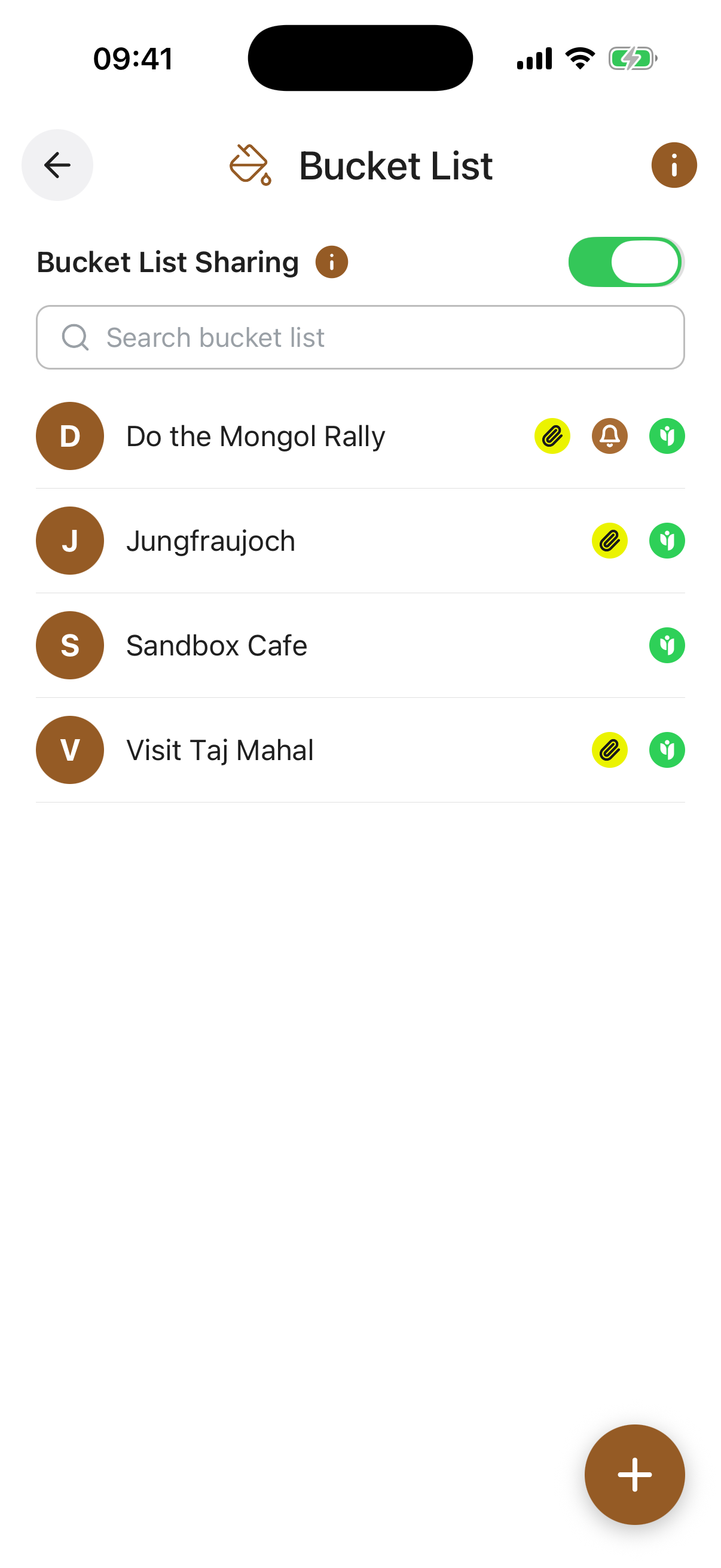
When the toggle is on, every item you have shared is visible to the contacts you chose. When it is off, nothing is shared with anyone, even if individual items still have contacts set.
Your per-item sharing choices are always preserved, so you can switch everything back on at any time without setting it all up again.
Capture all the experiences and milestones that matter to you, big or small, so they are recorded and ready to revisit.
Attachments added to bucket list entries are stored in your Digital Vault and count towards your storage plan, but are only accessible through the entry itself, not through the Digital Vault feature.
Bucket List Sharing Toggle. A master switch for all bucket list sharing. When off, no entries are shared with anyone, even if individual entries have a contact set. Your sharing settings are preserved so you can turn it back on at any time.
Bucket List Entries. Each entry shows the goal name with a coloured initial. Tap an entry to view or edit its details.
Share Icon. A green Angel icon appears on entries that are actively shared with a contact.
Add (+) Button. Opens the form to create a new bucket list entry.
Title required. A short, clear title for this goal, for example “See the Northern Lights” or “Learn to play piano”.
Description. Describe this goal in your own words. Include where, when, who with, why it matters, or any steps you have already taken towards it.
Share With. Choose one or more trusted contacts to share this individual entry with. Each selected contact will be able to view the details you have entered.
Reminder. Set an optional reminder for this goal, with its own title, a short note, a date, and how often it should repeat (once, weekly, monthly, and so on). You can switch the reminder on or off at any time.
Attach Document / Photo / Video. Attach an image, video, or document to bring this goal to life, for example a photo of a destination or a clipping of inspiration. You can upload from your device or pull a file straight from your Digital Vault. Attachments count towards your storage plan.